
QR and NFC
QR Code vs NFC Tag for Product Packaging
A QR code is free to print and works with any smartphone camera. An NFC tag costs $0.20-0.35 per unit and needs a tap instead of a scan. Here's how to choose, and what matters more than either.
By Ali Murtaza ·
A QR code is free to print and works the moment a shopper points a camera at it. An NFC tag costs money per unit and needs a phone capable of reading it, but the shopper only has to tap, not open a camera app. Neither choice matters as much as what the code or tag actually leads to — a product page that sells the reorder, or a dead link.
How each one actually works
A QR code is a printed pattern. Any modern phone's camera app reads it and opens a link — no app to install, no setup on the shopper's side. An NFC tag is a small chip embedded in the packaging, label or cap. A shopper taps their phone against it, and an NFC-capable phone opens the link the same way. Most phones sold in the last several years support NFC, but not all of them, and a shopper has to know to tap rather than scan.
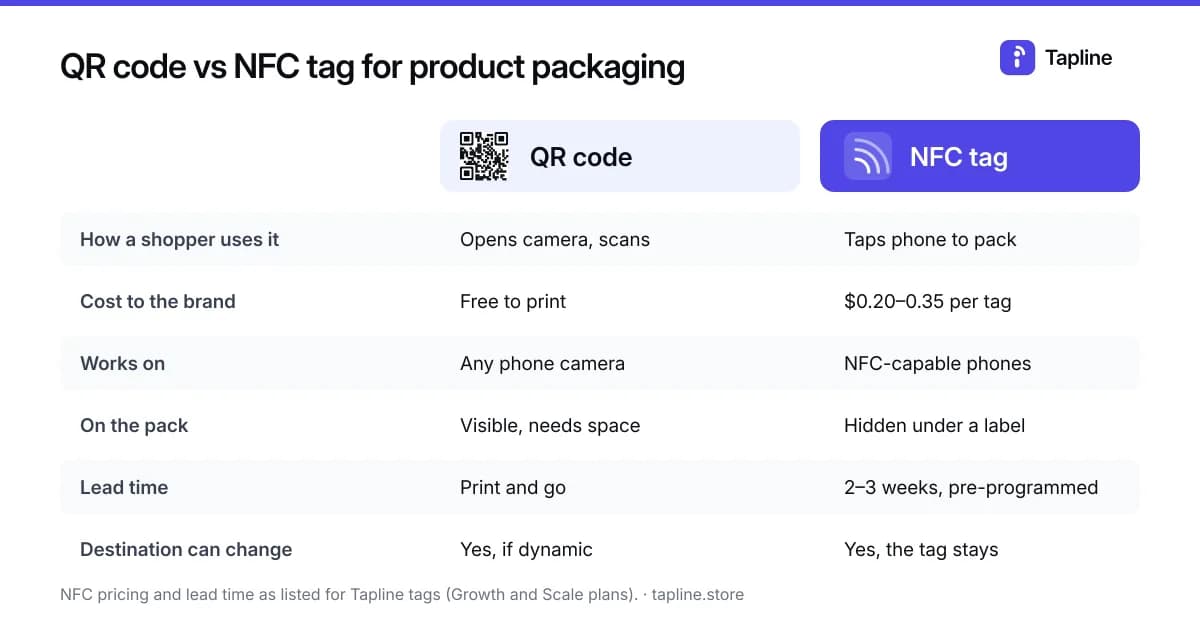
| QR code | NFC tag | |
|---|---|---|
| How a shopper uses it | Opens the camera app, points it at the code | Taps the phone against the pack |
| Cost to the brand | Free — print it with your existing packaging or labels | $0.20-0.35 per tag at volume, minimum order 25 |
| Works on | Any smartphone with a camera | NFC-capable phones only |
| Setup time | Print and go | Tags arrive pre-programmed, 2-3 weeks lead time |
| Can the destination change later? | Yes, if the code is dynamic | Yes — the physical tag never changes, only what it points to |
When QR alone is the right call
If you're adding a reorder page to packaging for the first time, start with a QR code. It costs nothing beyond printing, there's no lead time, and you'll learn whether shoppers actually scan before spending anything on hardware. A QR code printed on a label or insert works identically to one printed directly on the box.
When NFC earns its cost
- The unboxing moment matters to the brand — a tap feels more premium than asking someone to open a camera app.
- The product already sees repeat, in-hand use where a scan is awkward (a bottle on a shelf, a garment tag).
- You want a second channel alongside QR rather than a replacement for it — most brands running NFC keep the QR code too.
NFC tags on Tapline are an add-on on the Growth and Scale plans, priced from $0.20 to $0.35 per tag depending on volume, with a minimum order of 25. They arrive pre-programmed and linked to the page — nothing for the brand to configure beyond approving the page itself. The QR code stays free and included on every plan, including Free.
Full plan details, including the NFC volume pricing, are on the pricing page.
The part that actually drives reorders
Neither a QR code nor an NFC tag does anything on its own — they're both just a pointer. What determines whether a scan or a tap turns into a reorder is the page behind it: whether it has a reorder button that actually links to checkout, whether it asks for an email at the right moment, and whether it's fast enough that someone doesn't give up waiting for it to load. That's the part worth spending time on before deciding between QR and NFC.
Can I use both on the same product?
Yes. A QR code and an NFC tag can point to the exact same page. Many brands print the QR code on the main label as the default, and add an NFC tag for a premium or limited-run version of the same product.
Durability on a real pack
A printed QR code lives on the surface, so it can be scuffed, wrinkled on a pouch, distorted around a tight curve, or washed out by glare from a gloss or foil finish. Keep it on a flat label area with strong dark-on-light contrast and a clear margin around it, and test the printed proof under shop lighting. An NFC tag sits under the label, so scuffs don't affect it, but metal packaging and liquid-filled bottles can interfere with reading unless the tag is designed for that surface.
- Metal tins and foil-lined packs: use tags made for on-metal use, and test with the product filled.
- Curved bottles: keep the QR code small relative to the curve, or place it on a flat neck or back label.
- Pouches and soft packs: avoid seams, folds and crimps for both.
Phones, habits and a fallback
Every modern phone camera reads a QR code without an app. Most recent phones can also read an NFC tag in the background, including recent iPhones, but shoppers don't always know a tag is there, and some people keep NFC switched off. Two small habits fix most of that: print a tap icon with a short line such as "Tap your phone here", and keep a QR code on the same pack as a fallback that opens the same page.
Authenticity and limited runs
A QR code is a picture, so it can be copied onto anything. An NFC tag gives a stronger signal for limited runs and resale, because each tap is recorded and a repeat scan of the same tag can be flagged. That signal is about the tag's scan history, not proof that the product itself is genuine, so be precise about what you tell customers.
For what the first-scan check can and can't prove, see proof of authenticity for apparel and limited runs.
A simple way to decide
- Launching a page for the first time, or on a tight unit margin: QR only.
- Premium bottle, cap, garment tag or limited run where the tap is part of the experience: add NFC alongside the QR code.
- Unsure whether shoppers will engage at all: run QR for a month, look at scans per product, then add NFC to the products that already get scanned.
Whichever you choose, the destination should be dynamic, so the printed code or programmed tag never has to change when your store, prices or product details do.
Getting the printed code right — size, quiet zone, contrast and placement — is covered in how to put a QR code on product packaging.
If you're weighing platforms as well as hardware, compare what each one charges in what a QR code actually costs to run.