Wine
Wine Bottle QR Codes That Turn Into Reorders
How a winery can use a second QR code on the bottle to win repeat orders: where the reorder button points, what the page shows, vintages, shipping and tracking.
By Ali Murtaza ·
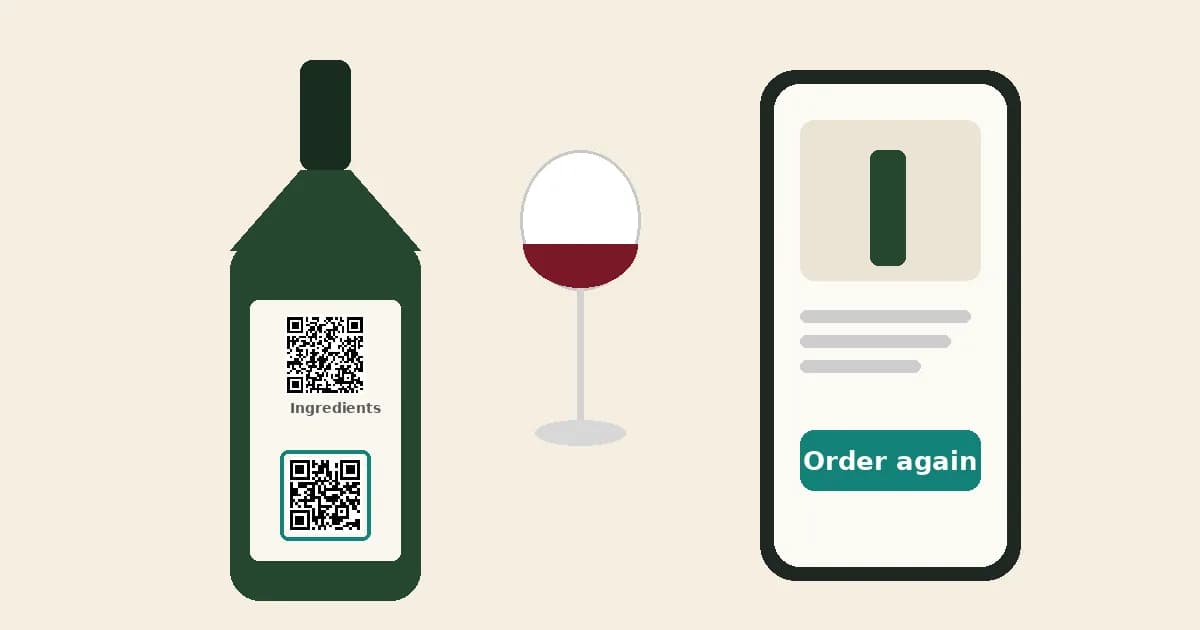
The best moment to sell a bottle of wine is while someone is drinking it. They like it, the bottle is on the table, and they want to remember the name. A week later that moment is gone, and if they search at all, they often end up at a big retailer or a different wine. A marketing QR code on the back label that opens a page with a reorder button keeps that moment for you. This guide covers how to set one up so it actually leads to repeat orders.
Plain-language guidance, not legal advice. Check the rules for your own wine and markets with your compliance adviser.
Can the EU e-label QR code have a reorder button?
No. In the EU, the page behind the "Ingredients" code must show the ingredients and nutrition information without sales or marketing content, and it must not collect or track user data. A shop link counts as marketing. So the reorder button goes on a second, clearly separate QR code. Our guide to two QR codes on a wine label covers how to place both codes, and the EU e-label rules post covers the rule itself.
Why does a reorder QR code matter for a small winery?
Most bottles from small and mid-size wineries are drunk far from the cellar door: in restaurants, at dinner parties, as gifts, or in another country. The person holding the bottle often didn't buy it and has no easy way back to you. A reorder code gives them a direct path to your own shop, where you keep the full margin and the customer relationship instead of handing both to a marketplace.
It also works for people who did buy from you. A drinker who enjoyed a bottle from your club shipment or your cellar door can order another case in a few taps, instead of remembering to visit your site later.
Where should the reorder button point?
- The exact wine, not your shop's homepage. The drinker already knows what they want. Send them to that wine's product page, ideally with the vintage they're holding.
- A page that works well on a phone. Almost every scan happens on a phone, often in dim light. Check that the product page, age check and checkout are easy to use on a small screen.
- Your own shop. Any online store works, because the button is a plain link. You don't need a particular platform.
- A case or mixed-case option if you sell them. Someone who loved one bottle is a good candidate for six.
Add your own UTM tags to the shop link you paste in (for example ?utm_source=bottle&utm_medium=qr&utm_campaign=reserve-2023). Your shop's analytics will then show which orders came from the bottle.
What should the page show before the button?
A page that is only a "Buy" button feels like an ad. A short story page earns the click. Keep it to what a drinker wants while the glass is in their hand:
- Tasting notes in two or three plain sentences.
- Food pairings and the drinking window.
- The region and a line or two about the vineyard or winemaker.
- Then the reorder button, with a clear label such as "Order this wine again".
Tapline's AI drafts this page for each wine, and you review and approve it before it goes live. Keep the reorder button high enough on the page that nobody has to hunt for it.
How do I handle a new vintage or a sold-out wine?
Use a dynamic code, which stores a short link you can redirect later. When the 2023 sells out, point the button at the 2024 and update the tasting notes. The printed code on the bottle stays the same, so there's nothing to reprint. If a wine is gone for good, say so on the page and point the button at the closest wine you still sell. A dead link on a bottle that's still in someone's cellar loses you that customer.
What about age checks and shipping limits?
Your own shop should handle age verification and the regions you can legally ship to, just as it does for any other visitor. The page behind the code should also say plainly where you ship, so a drinker abroad isn't surprised at checkout. If you see steady scans from a country you can't ship to, that's useful too: it may be time to talk to an importer or distributor there.
What should the call to action on the label say?
An unlabelled square rarely gets scanned. Give the marketing code its own short line that says what happens next, and make sure it doesn't sound like the legal e-label:
- "Loved it? Scan to order another bottle"
- "Scan for tasting notes & to reorder"
- "Scan to get this wine delivered" (only if you deliver to the places the bottle is sold)
Only promise a reorder on the label if the page really has a working reorder link. Avoid words like "Product information" or "Nutrition" on the marketing code, so buyers don't confuse the two.
How do I know whether the reorder code is working?
Look at two numbers side by side. Scans tell you how many people opened the page; Tapline shows scans per code over time, without storing personal data about who scanned. Orders come from your shop's own analytics, filtered by the UTM tags on the reorder link. Tapline doesn't see your sales, so it can't count bottles sold for you.
To learn faster, give each channel its own code: one for restaurant lists, one for retail, one for the cellar door. If one channel produces far more scans, that's where your bottles are reaching curious drinkers. Our post on what QR scan data can and can't tell a winery explains how to read these numbers without over-reading them.
A simple setup checklist
- Keep the Ingredients code plain and separate from the marketing code.
- Write a short story page for each wine: notes, pairings, drinking window, origin.
- Point the reorder button at that exact wine in your own shop, with UTM tags.
- Check the shop, age check and checkout on an iPhone and an Android phone.
- Print a clear call to action next to the marketing code, at least 2 × 2 cm with a clear margin.
- Scan the printed proof before the full label run.
- Set a reminder to update the page when the vintage changes or a wine sells out.
FAQs
Do I need Shopify to add a reorder button?
No. The reorder button is a plain link, so it works with any online shop. Shopify sync, which would keep price and stock current automatically, is coming soon on Tapline's Scale plan.
Can drinkers join my wine club from the page?
You can add a link to your own club page today, the same way you'd link to an event or a cellar-door booking. Wine club and email signups stored inside Tapline for export are coming soon.
Can the page be in more than one language?
You can write the page in whichever language suits the market. Several languages on one page, chosen by the drinker, is coming soon.
Which Tapline plan includes the reorder button?
The Growth plan, at $29/month, includes the reorder button and scan analytics for up to 10 pages. The Free plan gives you one page and its QR code, without the reorder button. See the pricing page for the full comparison.
Will a reorder code work on bottles already in the market?
Only if the code is already on the label. For bottles that are printed and shipped, a neck tag or a sticker with the marketing code can work for a single run, but the cleanest route is to add the code at your next label print.
Where does Tapline fit?
Tapline gives each wine its own marketing page and QR code: a story page your drinkers will actually read, a reorder button to your own shop, and scan counts per code. It sits beside your e-label, not in place of it. Tapline is built by Esipick, which has been building software for brands since 2013. Our wine page shows what happens after the scan.
Related: what happens after the scan.
Related: two QR codes on a wine label.
Related: what QR scan data can tell a winery.
Related: how to add a reorder button to packaging.
Related: EU e-label rules for wine.
Related: pricing.